Super Route Manager
Screens & System Overview
Latest Version Release Date: April 1, 2023 Return to Home Page
 |
Our support team will set up SRM for you
|
Super Route Manager is a comprehensive, fully integrated route management system. Developed for Windows system using either Microsoft's Access or SQL Server database, a SRM system represents the industry's most scalable package for AMUSEMENT, VENDING, and most any coin-operated route operations. Whether you have five or five hundred locations, 100 or 10,000 machines Super Route Manager is a great solution. One system handles all your processing! Look at these intuitive features and see why SRM is the industry benchmark for route management:
Pre-Installation: Scrap Metal Manager is for use on one of the following Microsoft operating systems (2000 SP3+ , XP, & Vista, 7, & 10) with the most current Windows Updates applied. If a previous version of Super Route Manager is installed, make sure you select Remove first then run again for the installation. On an existing system always make a backup of your database before you upgrade. Place that backup copy of the database on a flash-drive or CD/DVD.
Registration: To register SRM email us the name of your computer as it appears on the registration window to register@premierdatasoftware.com We will return a Registration Code to your email address.
Screen Shots
To view any of the associated subsystems from a Main Menu, click that Main Menu image. Use your browser's [Back] button to return to this page.
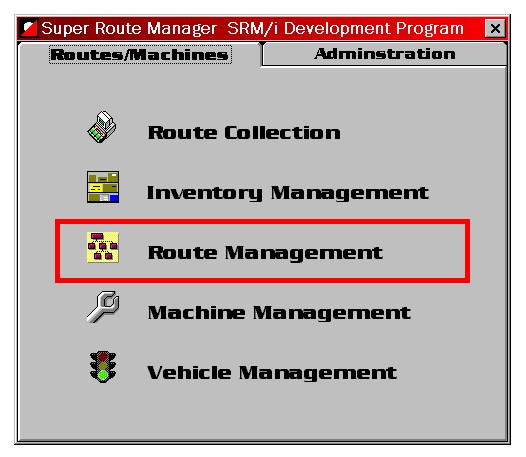
Click the subsystem names to view the corresponding Collections subsystem screens.
|
The menu design incorporates Tab pages to distinguish the primary areas of functionality, thus making departmentalization easier. The left menu tab is used for Collection Processing functions including entities; routes, locations, machines, and inventory. The right menu tab handles office administrative functions, as seen on the screen below. Functionality is so flexible in SRM. Use as much or as little as you would like. Track collections, track Inventory, track meters, track vehicles....or not. Get the picture?
|
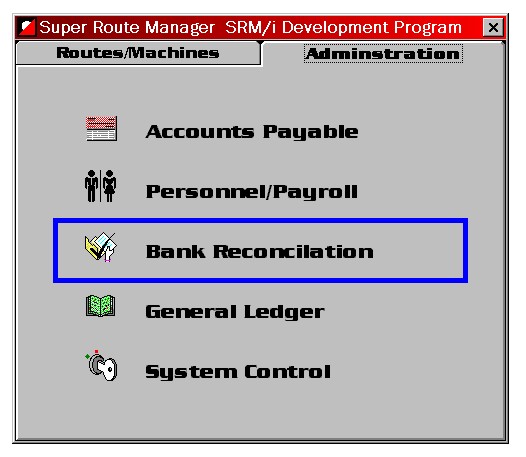
Click the subsystem names above to view the corresponding Route Manager subsystem screens.
|
User access and security is controlled and designated here. Your systems administrator has the ability to grant or revoke access to user-employees, controlling who can see what and who can modify what. Each subsystem is loaded from the server, making subsystem upgrades centralized and easy. As we upgrade or enhance subsystems, they can be downloaded from our Web site or we can e-mail them to your system administrator.
|
|
In addition to the functionality above, Premier Data Software has a 30 year history of custom software development. If your needs exceed or differ from the functionality above, we can design software to accommodate you exactly the way you need it. |
|